CrystalKarat presents
Forge: multiband saturation without the price tag
Multiband saturationwithout the price tag
Up to six bands, ten saturation characters, an effect in every band, Wobble, a band-by-band sidechain and a switch that runs it all through tired gear. Build it yourself, or let Analyze make the first pass.
Windows VST3 · macOS VST3 & AU · Buy once or subscribe · 7-day trial, no card
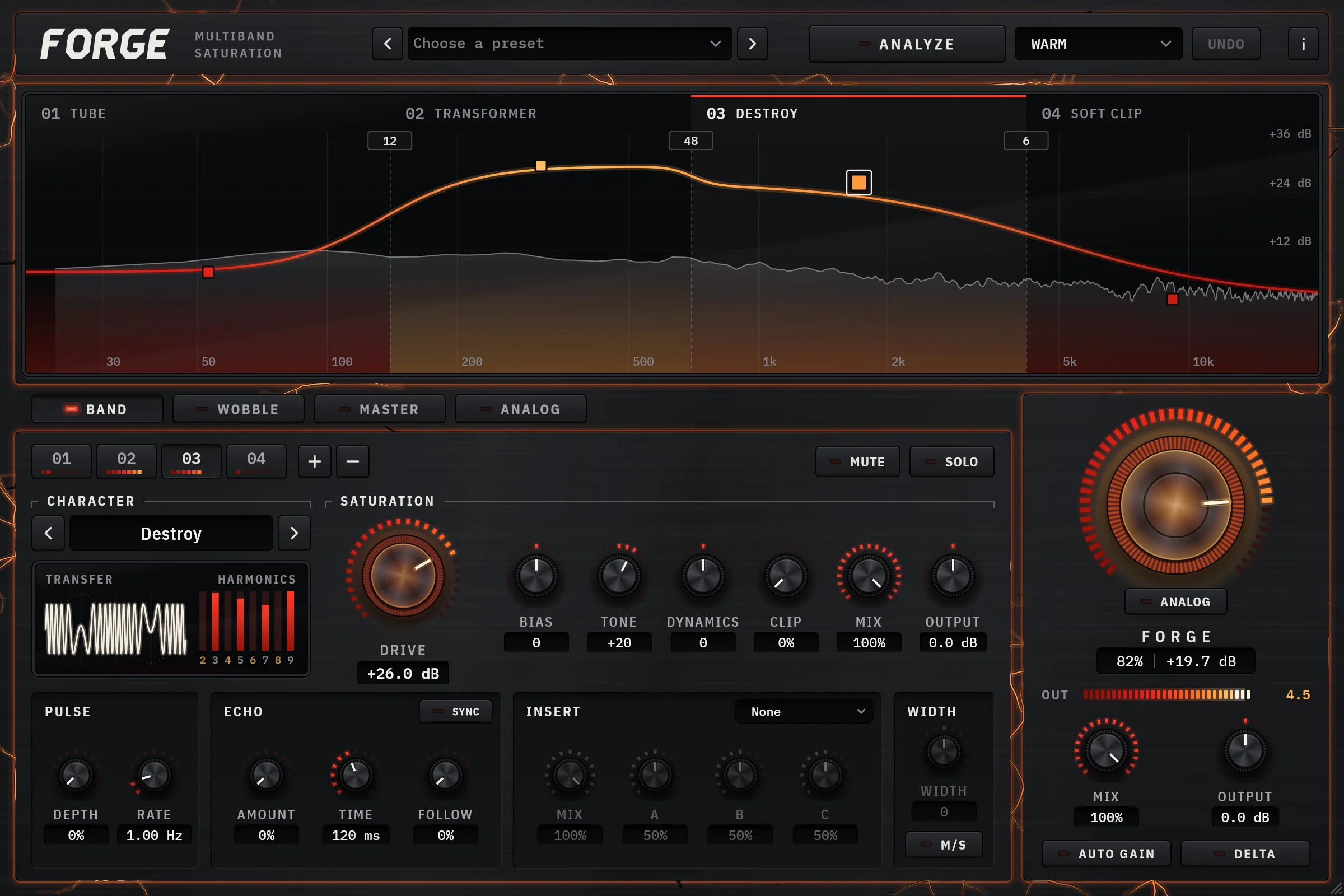
Most multiband saturators make you guess where the bands go. Forge listens first.
Pick a character. Play four seconds. It designs itself.
Choose what you want the track to become and press Analyze. Forge listens, finds where your material naturally divides, and puts a band on every register it reaches: a vocal gets no sub band, a full mix gets the lot. Each crossover moves into the spectrum's own valley, so no kick or bass note is cut in two, and a deep valley earns a steeper slope.
Then it voices every band. Forge probes each band's own character across the levels that band plays at and sets the drive that adds exactly the distortion the character calls for: about 3% for Warm, half a percent for Master. Every band is rendered and trimmed back to its own level, and the whole result is matched to the loudness of what went in, so a louder result cannot pass for a better one.
Try another character and it re-voices from the same four seconds, no replay. Undo puts back everything it touched; your echoes, inserts and Wobble are never touched at all.
- WarmValve and tape on the lows and mids at about 3% distortion, softer transients, a rounder top, gentle 12 dB/oct crossovers.
- PunchIron and clean tape with sharpened transients, blended in parallel on the attack bands so the hits land harder and the dry attack survives.
- AirEven-harmonic sheen from biased valve on the presence and air, in parallel and brightened a touch. Everything below the mids stays dry.
- GritAmp driven into its clip on the mids, iron on the lows, a dry sub and a tamed top: attitude without fizz or mud.
- CrushHard distortion and wavefolding at 20 to 30% distortion, split at 48 dB/oct so the sub stays solid under the wreckage.
- MasterBarely-there density for a finished mix: 0.3 to 0.6% distortion per band, gentle 12 dB/oct crossovers and 4x oversampling.
- Bands OnlyPuts a band on every register the material reaches, each crossover in a valley of the spectrum, and leaves every band's sound as it is.
- Character
- Warm Tape
- Drive
- +0.0 dB
- Distortion
- --
- Dynamics
- +0
- Mix
- 100%
- Edges, dB/oct
- -- / 24
Pick a character and press Analyze. Forge listens for four seconds, then designs the bands.
The demo lays out, voices and calibrates exactly as the plugin does, on typical spectra for each source. In the plugin, the spectrum and each band's loudness come from your own audio.
One knob drives every band at once.
Forge opens on one screen: the presets and Analyze across the top, the display, the deck for whichever band you pick, and on the right the core column with one big FORGE knob. It adds up to +24 dB of drive to every band at once, on top of whatever each band is already set to, so the whole engine runs hotter while the balance between bands holds.
Turn it up and it burns. The knurl tempers red and the core glows, and the plate cracks round the parts of the panel doing the work, the cracks glowing with what you hear. At rest it is clean metal. Under it sits the ANALOG switch: flick it on and the same knob pushes the signal through tired gear, hissing, crackling and sagging the further it turns.
Everything else is one press away. Click a band on the display and the deck below shows every control it has; the Wobble, Master and Analog decks sit beside it on push buttons that light while their deck is doing something.
FORGE
28%+6.7 dBDrag, or click and use the arrow keys. Double-click to reset.
The white line is each band's own drive. The FORGE knob adds the same amount on top of all of them, so the balance you set between bands survives.
45.1% THD
+4.7dB
Measured through the same saturation as the plugin, running in your browser. Auto Gain starts off, as in the plugin, so this is how much louder saturation alone makes it. Switch it on and the output tracks the input, so turning up drive changes the character and not the volume.
Tape, tube, iron, amp. Then the dangerous ones.
Any character on any band, mixed freely across the spectrum. Every one passes a clean signal at unity gain, so trying them at low drive changes the colour and not the volume. Driven, each keeps a little of the level it adds, the way an analog stage does, and how much is part of its character.
Bias scales the two halves of the wave apart for even harmonics without more drive. Turn it up below and the even harmonics, drawn in amber, climb.
Transformer
A soft clip on a flux model: bass saturates the core before treble.
Best forIron, punch, the drum bus
Blend it at 50%. Hear nothing cancel.
Parallel saturation only works if the dry signal lines up with the wet one. In a multiband plugin that means matching the phase the crossovers leave behind, not just the latency. Drag the Mix below, or change the slope, to see what it costs when they do not.
Shown for crossovers at 140 Hz, 700 Hz and 4.2 kHz, all at the slope you pick. The silver curve's dips move with Mix and slope; only a 6 dB/oct split, whose bands add straight back to the input, has no phase to match. Forge's dry path carries the same all-pass as the bands, so its line stays at 0 dB at every setting.
Bands that sum flat
Splitting off a band and then splitting the remainder leaves every band with a different phase. Forge re-applies each later crossover's all-pass to every earlier band, so the whole split recombines flat, with any slope on any crossover.
A dry path that matches
The dry blend runs through the same oversampler and all-pass as the bands, and the sub-bass passthrough gets the same all-pass and a matching delay, so Mix at any setting blends cleanly instead of combing.
Measured at every setting
Every release of Forge is measured at every oversampling setting, filter type and crossover slope: a 50% blend of clean bands stays within 0.1 dB from 100 Hz to 20 kHz.
Six bands, each with the full chain.
Split a band with +, on the display or beside the band chips, drag crossovers anywhere from 20 Hz to 20 kHz and give each one its own slope, from a gentle 6 dB/oct blend to a surgical 48. Every band gets the complete chain on the Band deck: dynamics, bias, character with a live transfer scope and harmonics, pulse, clip, tone, echo and its own insert effect, with mute and solo to hear exactly what it is doing.
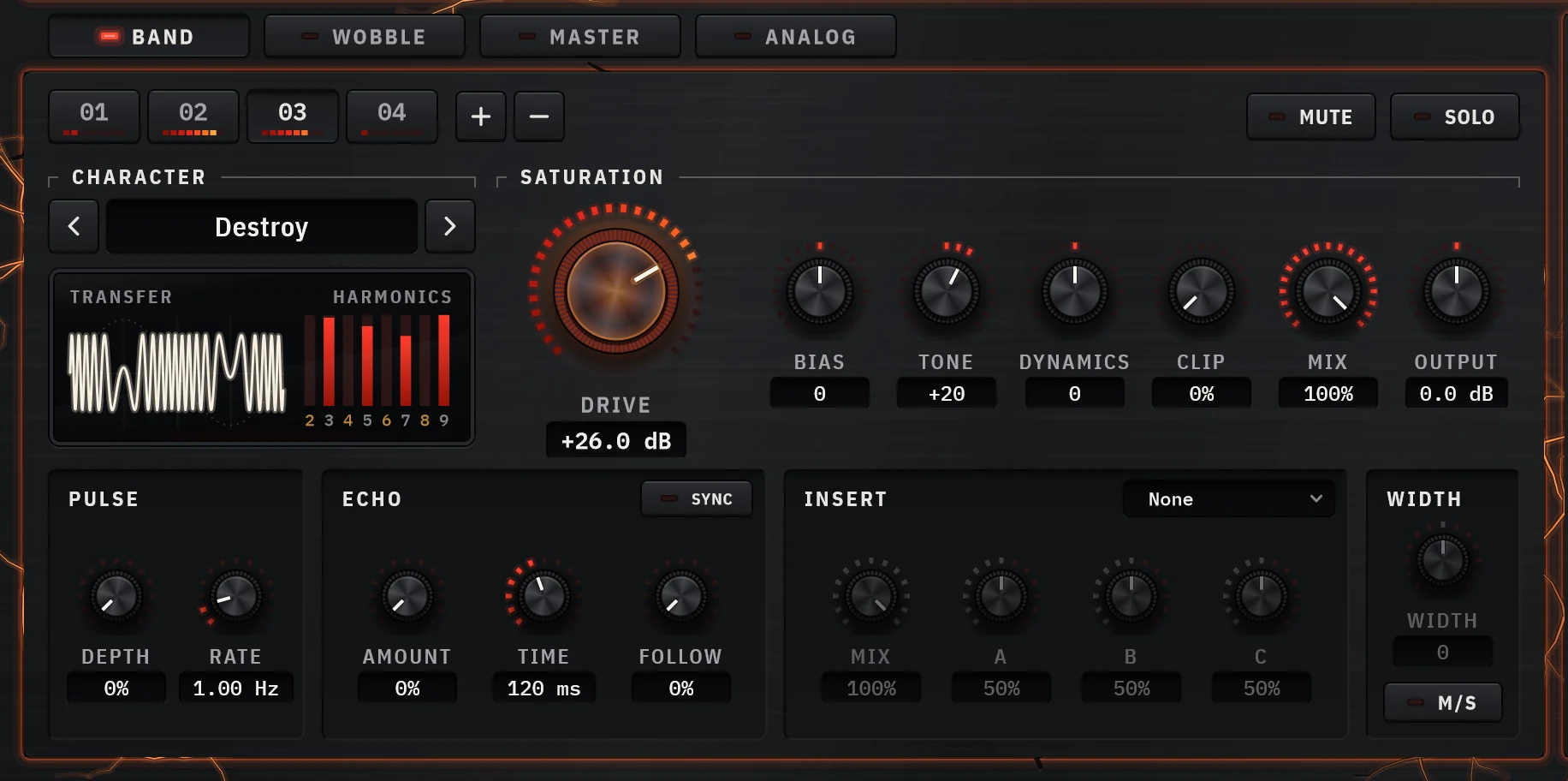
- Drive
- 0 to +36 dB into the band's character
- Bias
- Even harmonics, independent of drive
- Tone
- ±6 dB tilt around 250 Hz and 4 kHz
- Clip
- A falling ceiling after the shaper
- Mix
- Parallel saturation, per band
- Width
- Per-band stereo width in Mid/Side mode
- Dynamics
- Soften or sharpen transients before they hit the shaper, ±15 dB
- Pulse
- A per-band tremolo, from slow pulsing at 0.1 Hz to audio-rate AM at 500 Hz
- Feedback
- Comb, resonance or echo inside the band
- Time
- 1 ms to 1 s, or locked to the host tempo
- Follow
- Ducks the feedback while the source plays
A complete effect inside each band, after the shaper: a phaser on the mids only, a slapback delay on the air, a compressor on the low band alone, right after its saturation. You can even automate the effect type: switching it mid-playback causes no dropouts.
- Filter
- Delay
- Chorus
- Flanger
- Phaser
- Compressor
- Bit Reducer
Six destinations. Six oscillators. Nothing to patch.
The Wobble deck is a list and one editor. The list shows all six targets at once: each lights while it moves something, with its pattern playing in miniature, how deep and how fast. Click one to bring it into the editor; that never changes the sound. Its depth is what starts and stops it.
Every target runs its own pattern at its own rate, so a square tremolo on eighths can sit under a slow filter sweep across a whole bar: two movements one shared oscillator cannot make. Synced to your host's tempo and locked to its bar by default, free-running when you want texture instead of rhythm. Start from eight ready-made wobbles, or drag any pattern to draw your own from it.
A low-pass rocking on eighths, with a half-note accent on the level.
The demo runs at 120 BPM. In the plugin a synced pattern follows your host's tempo and locks to its bar.
One switch, and FORGE leans on tired gear.
Flick ANALOG on under the FORGE knob and the signal runs through gear that has seen better days: hiss, hum and crackle, and the sag, dropouts and fizz of a circuit pushed past comfort. You hear it the moment it is on; the Analog deck, a press away beside Band, Wobble and Master, holds every control.
The harder you drive, the harder the gear works. The deck runs on load, the input level plus FORGE's drive, and a LOAD meter shows it: turn FORGE up and the crackles and dropouts come more often, the level sags and darkens further and the fizz grows. The noise goes in ahead of the saturation, so the bands drive it up and the characters roughen it, the way noise behaves in real gear.
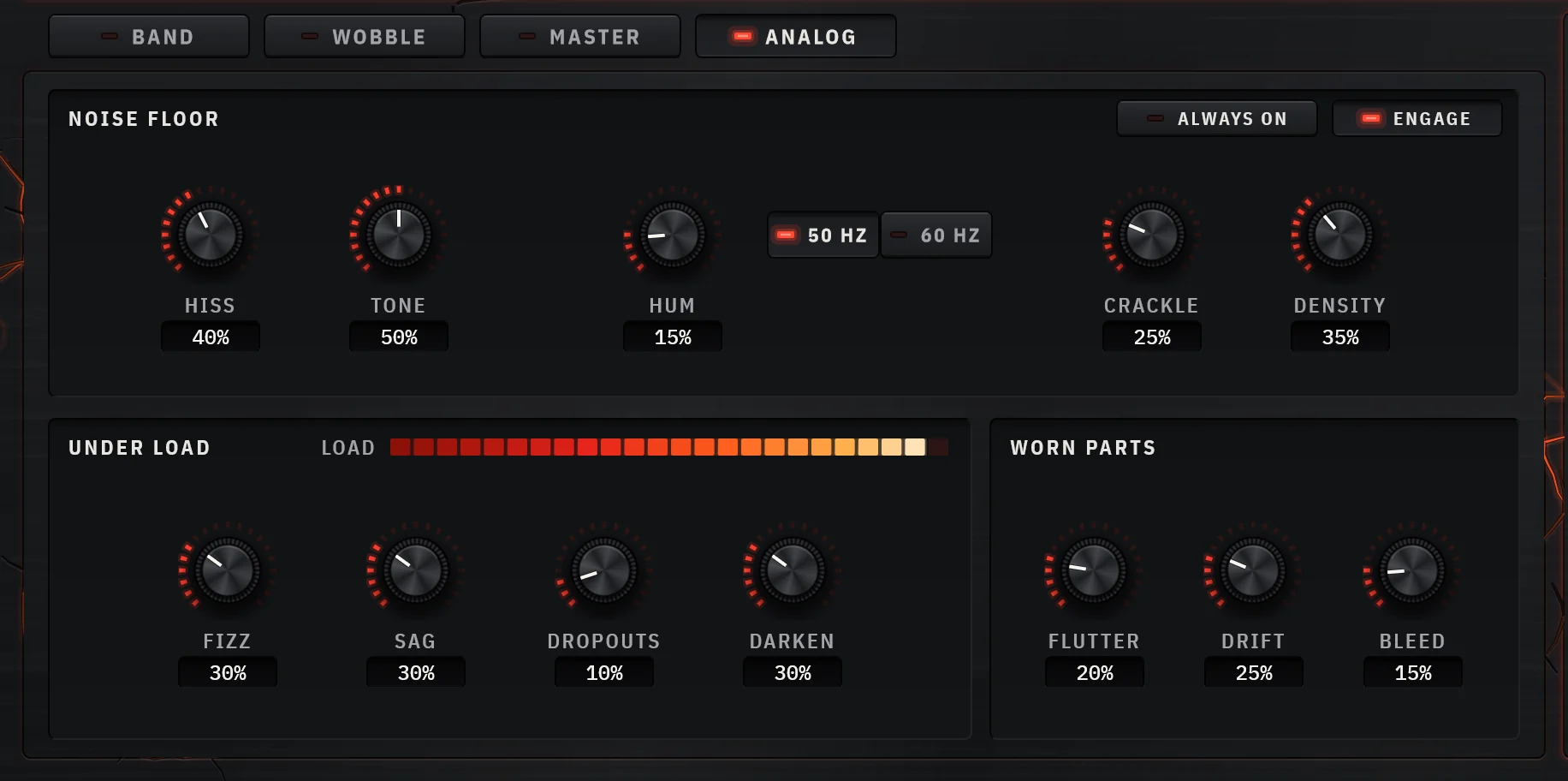
- Hiss
- Steady noise, separate on each side, with a Tone from a dark rush to a bright sizzle
- Hum
- Mains buzz at 50 or 60 Hz, with its harmonics
- Crackle
- Random ticks and pops, with Density for how often; harder hits crackle more
- Fizz
- Bright grit riding on the signal itself, so it is only there on the hits
- Sag
- The level dips under load and recovers slowly, like a struggling supply
- Dropouts
- The signal briefly drops away at random, more often the harder it is hit
- Darken
- The highs give way as the gear is pushed
- Flutter
- Wow, flutter and scrape from a moving delay. It starts at zero, because a delay that moves is one your DAW can't compensate
- Drift
- Each side's level wanders slowly, on its own
- Bleed
- Each side leaks into the other, the highs most
The noise floor follows the signal and fades when the music stops, so forty instances don't hiss through every gap. Always On keeps it running.
Mix blends the effect and Delta plays it alone. A muted band takes its share of the noise with it, and Auto Gain leaves the sag and the hiss as you set them.
Every bounce sounds the same at any buffer size, and two instances never hiss in unison. Switched off, it changes nothing: older projects open with it off and sound exactly as they did.
Then finish the bus in the same plugin.
Stereo, sidechain, filters, a compressor and the engine's quality settings all live one press away from the bands, on the Master deck.
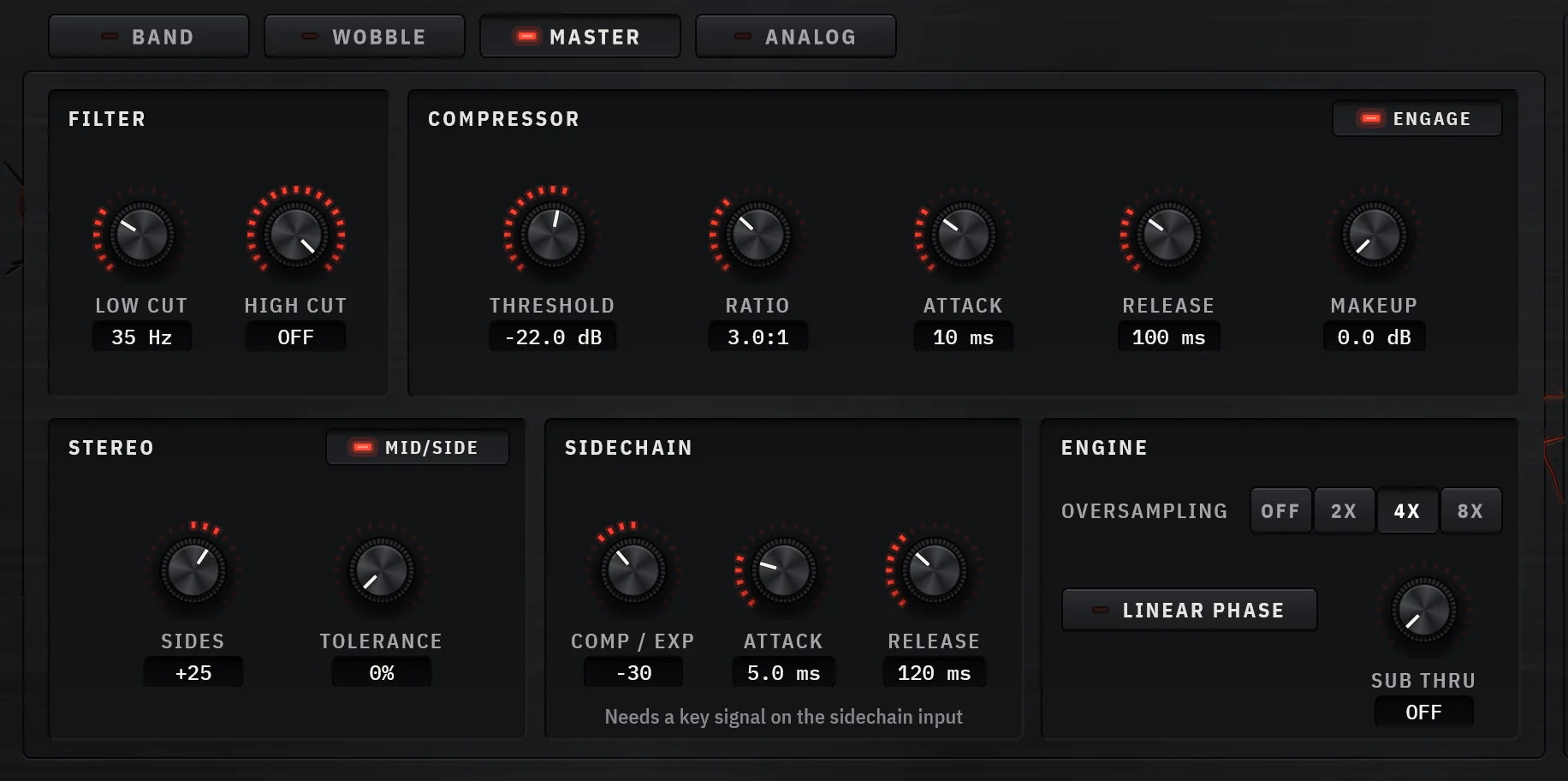
Flip the engine into Mid/Side and the centre and the sides each get a complete band chain. Saturate the middle without smearing the sides, narrow the lows, widen the air.
An external key is split through the same crossovers as the audio, so each band ducks or expands against its own slice of the key, up to ±24 dB. The display draws every band reacting.
Everything below a frequency you choose stays bone dry and comes back phase-aligned. The low end holds still while everything above it gets worked.
High-pass and low-pass filters, a soft-knee compressor, output trim and a global mix after the bands. Finish the bus without reaching for another plugin.
Less aliasing at 1×, and bass that saturates first.
The analog characters are voiced waveshapers rather than circuit models. The engineering around them is what makes them sound right, and the charts below measure it with the same saturation that runs in the plugin.
Antiderivative antialiasing, no oversampling tax
Clean Tape, Tube, Amp, both distortions and Soft Clip switch on antiderivative antialiasing as soon as they are driven into their curve, so most aliasing never happens, even without oversampling. Below the curve they pass the signal untouched. Warm Tape and Transformer shape an integrated flux signal and, like Destroy, lean on the oversampler; Bit Crush aliases on purpose.
A 5 kHz tone into Soft Clip at +18 dB, no oversampling. Every peak off the 5 kHz series is a harmonic folded back from above 24 kHz. The fold at 3 kHz drops from -35 dB to -72 dB; first-order ADAA does least right at the top, near Nyquist, which is what oversampling is still there for.
Bass hits the core first, like real iron
Transformers and tape saturate on magnetic flux, which builds up most at low frequencies, so bass drives the core harder. Transformer and Warm Tape model it. Same level, same drive, two frequencies:
Transformer at +12 dB, both tones at −6 dBFS. Dashed: the same gain with no saturation. Until the shaper bends, the flux model leaves the signal unchanged.
Channel tolerance
Component tolerance, off by default, offsets each channel's drive and bias by a slightly different amount: the small left-right mismatch that reads as analog width. Each instance gets its own mismatch, sessions recall it exactly, and at zero both channels are identical.
Hear exactly what it adds
Solo or mute any band. Delta monitor swaps the output for wet minus dry, using the same phase-matched dry path as Mix, so you hear only what the saturation contributes.
Quality you can choose
Off, 2×, 4× or 8× oversampling, minimum-phase or linear-phase, with latency reported to your DAW at every setting so everything stays in time. Bit Crush's rate is fixed in hertz, so presets sound the same at any sample rate.
Everything, at a glance.
- Bands
- 1 to 6, split and dragged on the display
- Crossovers
- 6, 12, 24 or 48 dB/oct, set per crossover; Linkwitz-Riley from 12 up, flat-summing at every slope
- Characters
- 10, any one on any band
- Insert effects
- 7, one inside every band: filter, delay, chorus, flanger, phaser, compressor, bit reducer
- Modulation
- Wobble: 6 targets, each with its own oscillator; 6 shapes or draw your own; 8 ready-made
- Analog
- Hiss, hum and crackle; fizz, sag, dropouts and darken under load; flutter, drift and bleed. One switch under FORGE, which then stresses the gear
- Analyze
- 6 characters plus Bands Only, from 4 s of audio: crossovers, slopes and every band's drive calibrated, then level-matched. Re-voices without replaying; one-step Undo
- Oversampling
- Off, 2×, 4×, 8×; minimum-phase or linear-phase
- Sidechain
- External key, split per band, compress or expand
- Stereo
- L/R or Mid/Side, per-band width, global width
- Master
- High-pass, low-pass, compressor, output, global mix
- Monitoring
- Per-band solo and mute, delta
- Latency
- Reported to your DAW at every setting, so tracks stay in time
- Parameters
- 219, every one automatable
- Windows
- VST3 · Windows 10 or later, 64-bit
- macOS
- VST3 and Audio Units (AU) · macOS 10.13 or later, Apple silicon and Intel
- Interface
- 1200 × 800, resizable 75–150%, vector-sharp at any scale
- License
- Buy outright or subscribe. Two computers at a time, works offline for 30 days at a time once activated
Pro Tools (AAX) is not supported yet.
- Vocal
- Vocal Air · De-Harsh · Radio Voice · 20 more
- Drums
- Kick Punch · Parallel Smash · Tape Drum Bus · 21 more
- Bass
- Sub Harmonics · 808 Weight · Reese Phaser · 19 more
- Guitar
- Blues Breakup · High Gain Wall · Shoegaze Haze · 17 more
- Keys & Synth
- Rhodes Bark · Analog Heat · Acid Line · 20 more
- Bus
- Warm Glue · Analog Summing · Mix Punch · 13 more
- Master
- Mastering Glue · Master Air · Six Band Master · 11 more
- Lo-Fi
- Worn Cassette · Old Record · 12-Bit Sampler · 19 more
- Analog Gear
- Tired Tape Deck · Valve Console · Weak Power Supply · 16 more
- Movement
- Wobble Bass · Trance Gate · Stereo Swirl · 20 more
- Creative
- Wavefolder · Spectral Zebra · Phase Melt · 19 more
- Texture
- Hiss Floor · Vinyl Bed · Rain on Tin · 16 more
- Glitch
- Buffer Stutter · Skipping CD · Circuit Bent · 13 more
- Resonator
- Plucked C · Glass G · Sympathetic Strings · 10 more
Save your own alongside them; they are plain files in your Documents folder.
Multiband saturator
$49one-time
Yours to keep. No iLok, no dongle. Or subscribe to every plugin.
Secure checkout by Stripe. The trial needs no card. Either one creates your CrystalKarat account, where your key, activations and installers live.
What you get
- Forge for Windows (VST3) and macOS (VST3 and Audio Units)
- A perpetual license: buy once, keep it
- Two computers at a time, moved whenever you like
- Works offline for 30 days at a time once activated
- 276 factory presets across fourteen categories
- Your key by email and in your account, at once
Before you buy.
Which DAWs does Forge work in?
How does activation work?
How many computers can I use it on?
Why do I need an account?
Can I get a refund?
What does Analyze change, and can I take it back?
Does Forge model specific hardware?
Does the Analog deck add latency?
Is there a trial?
Forge
MULTIBANDSATURATIONStop guessing where the bands go.
Four seconds of listening, six bands, ten characters and one knob that burns.