CrystalKarat presents
Soap: SOAP
Clash analyserFree
Put Soap on a track and it shows where that sound fights the rest of the mix, in frequency and across the stereo image at once. The Wash takes the clash out, automatically or by hand, beside an M/S equaliser and R 128 and true-peak meters.
Windows VST3 · macOS VST3 & AU · Free with a CrystalKarat account · No key
See the clash
Not just which frequencies. Where in the stereo image, too.
An ordinary analyser shows two curves and leaves you to work out where they fight. Soap does the working out. It compares this track with the rest of the mix on one frequency axis, and only counts a clash where the two meet in the same part of the stereo image, because that is the part you hear as mud.
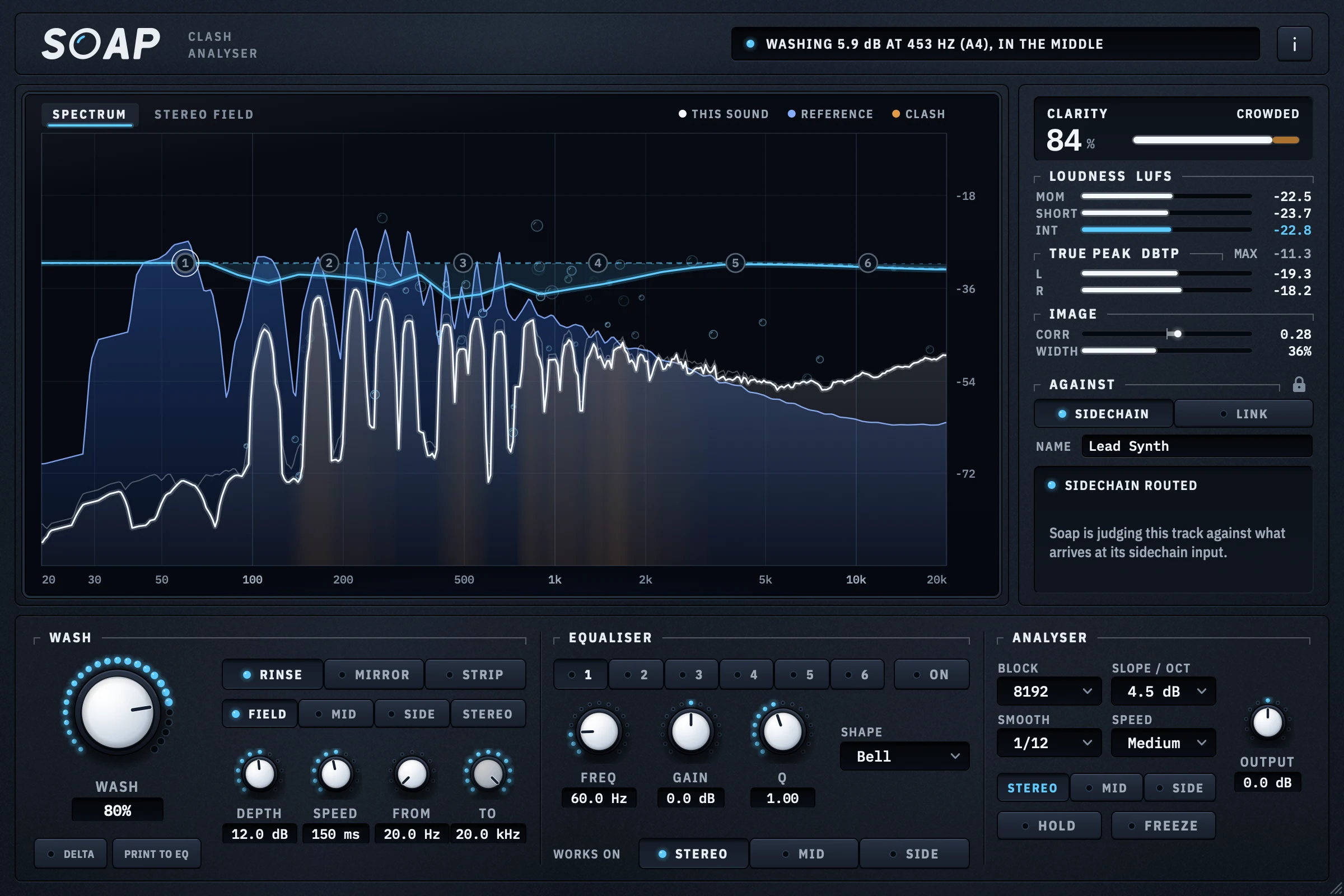
This sound's curve in white over the rest of the mix in blue. The ground they share is filled amber, as deep as the clash at each frequency, and the curve of everything Soap is doing runs above it.
Every frequency drawn as far from the centre line as it is wide, left above and right below. A bass in the middle and a pad out wide at the same frequency leave it clean. Two sounds in the middle light it up.
One number for how clear this sound is of the rest, 0 to 100 %, weighted by where it has its energy: clean, crowded, muddy or buried. The header names the worst clash, with its note.
- This soundThe track Soap sits on.
- ReferenceThe rest of the mix, from the sidechain or CK Link.
- ClashWhere the two share a frequency and a place in the image.
- Soap at workWhat the Wash is taking out.
Wash it out
Turn up the Wash. The clash goes.
The Wash is sixty narrow bells, thirty on the middle of the image and thirty on the sides, that move with the clash as the music plays. They are solved together, so a 6 dB cut really is 6 dB, and they add no latency. At zero Soap only watches, and what comes out is exactly what went in.
Rinse
Ducks this sound wherever it clashes, in proportion to how badly. An automatic mix move that follows the music.
Mirror
Cuts the shape of the rest of the mix out of this sound, whatever this sound is doing there. Room carved before anything fights.
Strip
Where they clash, takes this sound out altogether, up to 60 dB. For the frequencies one part should simply own.
- Choose where it may cut: the middle, the sides, both, or each for its own clashes
- Depth, speed and a frequency range, so it only touches what you mean it to
- Delta lets you hear exactly what is being taken out
- Print to EQ turns the last few seconds of washing into up to six static bands
- A six-band equaliser on the display: bells, shelves and cuts, each on stereo, mid or side
- Loudness to EBU R 128, true peak with overs, correlation and width
CK Link · with a subscription
Nothing to route. Soap already hears the mix.
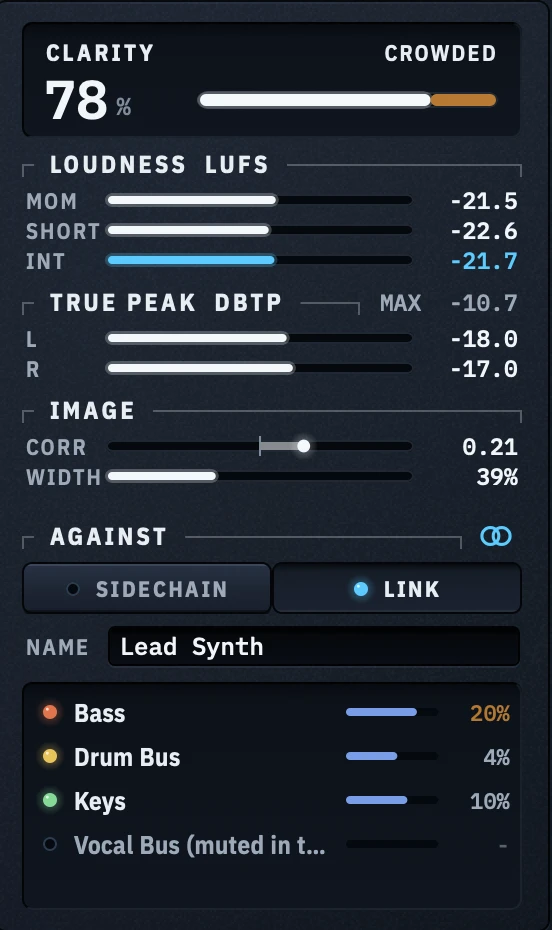
Free, Soap judges a track against whatever you send to its sidechain. With CK Link, every CrystalKarat plugin in your session tells the others what it sounds like, and Soap compares this track with all of them, by name. Bass is clashing at 20 %, the keys at 10 %: you know which fader to reach for.
CK Link comes with a CrystalKarat subscription. Enter the key once and it unlocks Link in every CrystalKarat plugin on that computer. Soap and Forge publish to it, Forge from version 0.2.1.
| Compared | Soap, free | Soap with CK Link |
|---|---|---|
| The reference | Whatever you route to the sidechain | Every CrystalKarat plugin in the session |
| Routing | A send or bus into Soap's sidechain | None |
| Who is clashing | The mix as one | Each track by name, with its own share |
| Leave a track out | Re-route it | Click its row |
Soap itself stays free either way. Without a subscription, Link is a small padlock in the corner of the Against panel; it never gets in the way. Questions about Link
Specifications
Everything, at a glance.
- Display
- Spectrum and stereo field on one axis, 20 Hz to 20 kHz; frequency, note and level under the pointer
- Clarity
- 0 to 100 %, weighted by where this sound has its energy: clean, crowded, muddy, buried
- Reference
- Sidechain input, mono or stereo. With CK Link, every CrystalKarat plugin in the session
- Wash
- 60 third-octave bells, 30 mid and 30 side. Rinse, Mirror or Strip; field, mid, side or stereo; depth, speed, range, delta, print to EQ
- Equaliser
- 6 bands: bell, low and high shelf, low and high cut, each on stereo, mid or side. Output trim
- Loudness
- EBU R 128: momentary, short-term and integrated LUFS
- Peak
- True peak (BS.1770, 4× oversampled), held maximum, overs
- Image
- Correlation and width
- Analyser
- Block 2048 to 16384, slope 0 to 6 dB/oct, smoothing to 1/3 octave, peak hold, freeze, stereo/mid/side view
- Latency
- None
- Channels
- Mono and stereo
- Windows
- VST3 · Windows 10 or later, 64-bit
- macOS
- VST3 and Audio Units (AU) · macOS 10.13 or later, Apple silicon and Intel
- Interface
- 1200 × 800, resizable from 75% to 150%, sharp at any size
- Price
- Free, with a CrystalKarat account. No key, no time limit
- CK Link
- With a CrystalKarat subscription
Pro Tools (AAX) and surround are not supported yet.
Questions
Before you download.
Is Soap really free?
Why do I need an account?
What does CK Link add, and how do I get it?
Which plugins appear on CK Link?
Do I need CK Link to get anything out of Soap?
Does Soap change my sound?
Which DAWs does Soap work in?
Find the mud. Wash it out.
Free on Windows and macOS. Create an account, download, and put it on the track that is not sitting right.