The best free mixing plugins, slot by slot
Free mixing plugins for every slot of a chain: finding the clash, EQ, compression, saturation, reverb and metering, with where each one goes and why.
By CrystalKarat8 min read
You can mix a record with free plugins. The stock tools in your DAW already cover the basics, and the best free third-party plugins are as good as plenty of paid ones at their jobs. What a free chain usually lacks is not quality but insight: the tools to see why a mix sounds cloudy or small, and which track is to blame. This guide picks the free plugins that fill each slot of a mixing chain, starting with that one.
Quick picks
- 01SoapCrystalKaratHearing why a mix is muddy, then clearing it, with the meters to finish onFree
- 02TDR NovaTokyo Dawn LabsThe free equaliser for problems that come and goFree
- 03IVGIKlanghelmColour and glue on every channelFree
- 04SPANVoxengoSeeing the whole mix’s spectrum and levelsFree
- 05ChowTapeChowdhury DSPTape on the buses and the masterFree
What a mix actually needs
Every mix needs the same handful of jobs done: EQ to make room, compression to control level, saturation for colour and density, space from reverb and delay, and metering to check what your speakers and room might be hiding. Your DAW has a decent tool for most of these. A free plugin earns its place by doing one of them better, or by doing something your DAW cannot, such as showing where two tracks are fighting.
Soap is ours: we make it, and it opens this list because judging one track against the rest of the mix is the job no stock plugin does. Everything else is another company’s.
The best free mixing plugins
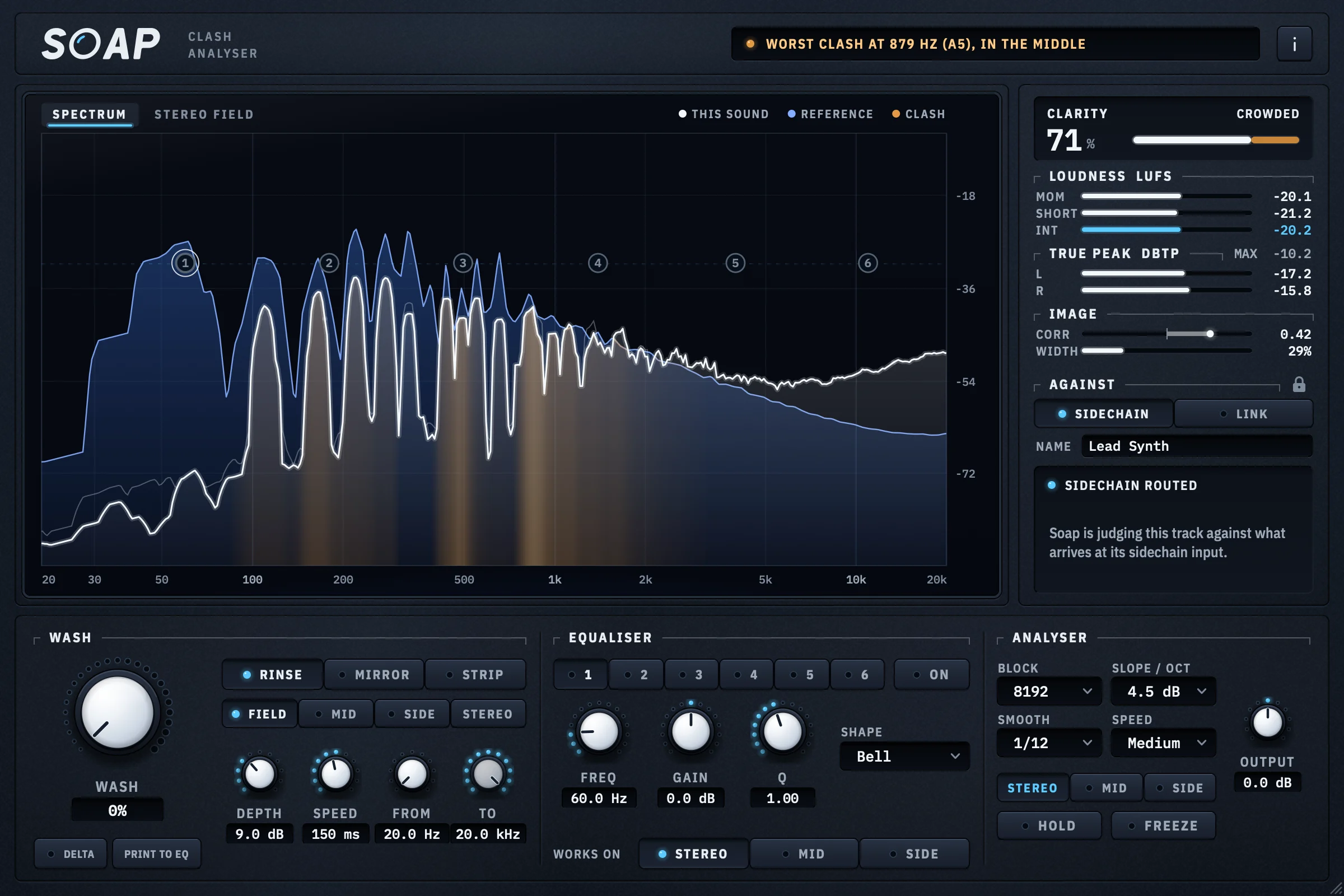
01Soapby CrystalKarat
Muddiness removerBest for: Hearing why a mix is muddy, then clearing it, with the meters to finish on
Most free plugins change a sound. Soap starts by telling you what is wrong with it. Put it on a track, send the rest of the mix to its sidechain, and it draws the track’s spectrum over the mix’s, fills the ground they share in amber, and gives a verdict: Clarity from 0 to 100 %, read as clean, crowded, muddy or buried. It looks at the stereo image at the same time, so you can see whether a clash is in the middle or out at the sides, which a plain spectrum analyser cannot show.
Then it fixes what it found. The Wash cuts the clash as the music plays, on the middle, the sides or both, and Print to EQ turns what it did into bands on a six-band mid/side equaliser you can refine. EBU R 128 loudness, true-peak, correlation and width meters sit alongside, and with the Wash at zero and the EQ off the output is the input bit for bit, with no latency, so it is safe to leave on the master as a meter.
Why pick it
- A muddiness verdict per track, in frequency and across the stereo image
- Automatic cuts you can print to an editable mid/side EQ
- Loudness, true-peak and correlation meters built in
- Free with no time limit, no key, no latency
Know first
- Its reference needs the rest of the mix routed to its sidechain
- Hearing every CrystalKarat track with nothing routed (Link) needs Studio Pass
- No AAX, so not in Pro Tools yet
- Price
- Free, with a CrystalKarat account · Link with Studio Pass
- Formats
- Windows VST3 · macOS VST3 and AU
Soap is ours: CrystalKarat makes it and publishes this blog. Everything else on this list is another company's, and nobody paid to be on it.
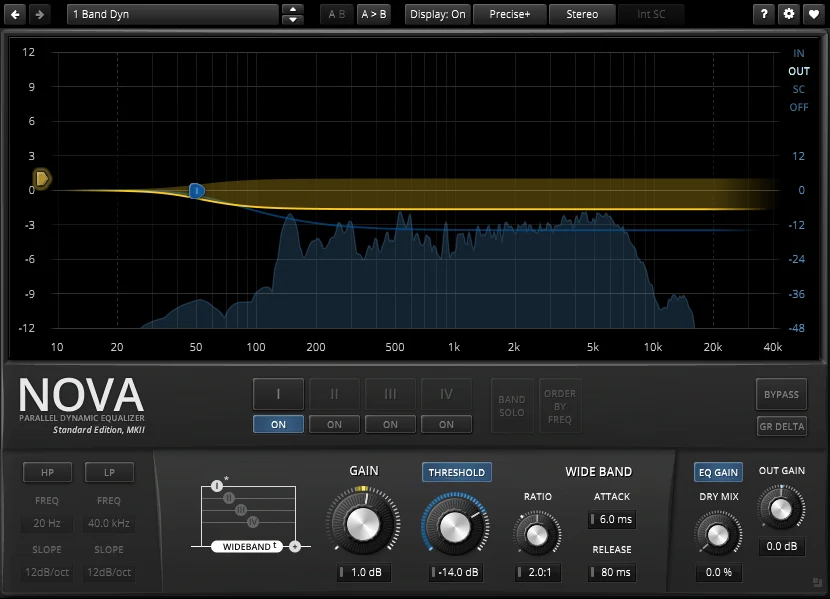
TDR Nova. Image: Tokyo Dawn Labs 02TDR Novaby Tokyo Dawn Labs
Parallel dynamic equaliserBest for: The free equaliser for problems that come and go
Nova is the best free dynamic EQ: four parametric bands, each of which can also be a compressor or expander on its own frequency range, plus high- and low-pass filters, a wideband compressor and an external sidechain. Use it as a plain EQ, then make a band dynamic when a problem only appears sometimes: the boom on a bass’s low notes, the harshness when a singer pushes, or a range you want to duck only while the kick plays.
Why pick it
- Static and dynamic EQ in one
- External sidechain for keyed cuts
- Every format
Know first
- Four bands
- More to learn than a plain EQ
Free · The paid Gentleman's Edition adds more
Tokyo Dawn Labs's page for TDR Nova (opens in a new tab)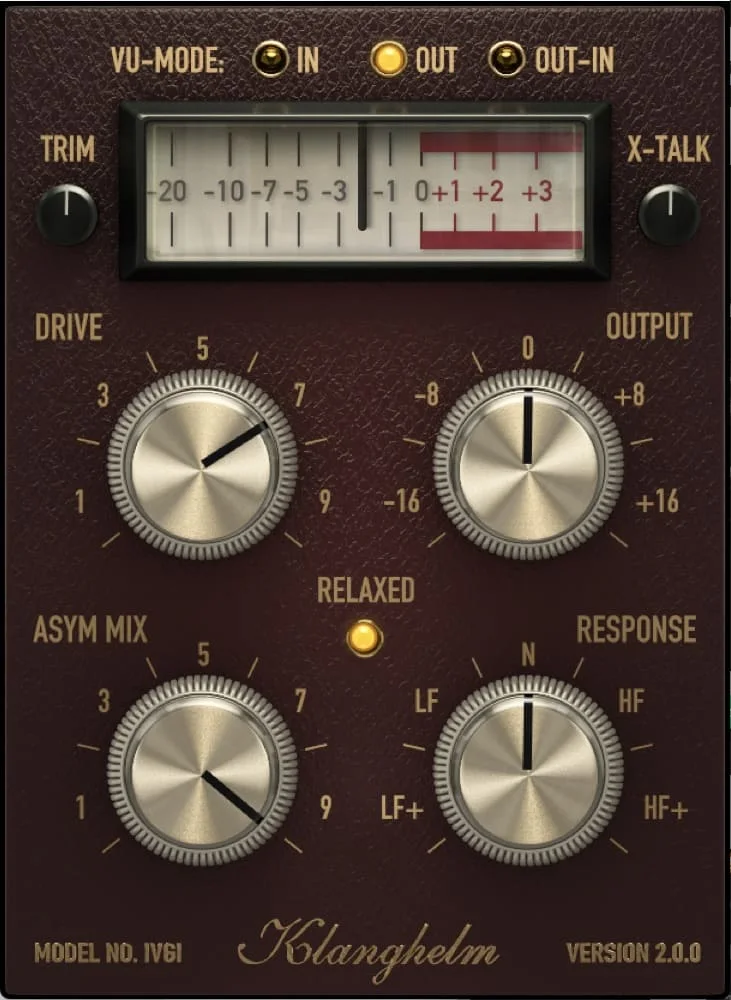
IVGI. Image: Klanghelm 03IVGIby Klanghelm
Subtle to heavy saturationBest for: Colour and glue on every channel
A little saturation on many tracks is what makes a mix sound finished rather than assembled, and IVGI is light enough to put on all of them. One Drive control from barely there to properly driven, Asym Mix for the harmonic balance, and Response to make it more or less dependent on frequency. More in our free saturation guide.
Why pick it
- Subtle to heavy on one control
- Light on the CPU
- No sign-up
Know first
- One character
- No tape or amp modes
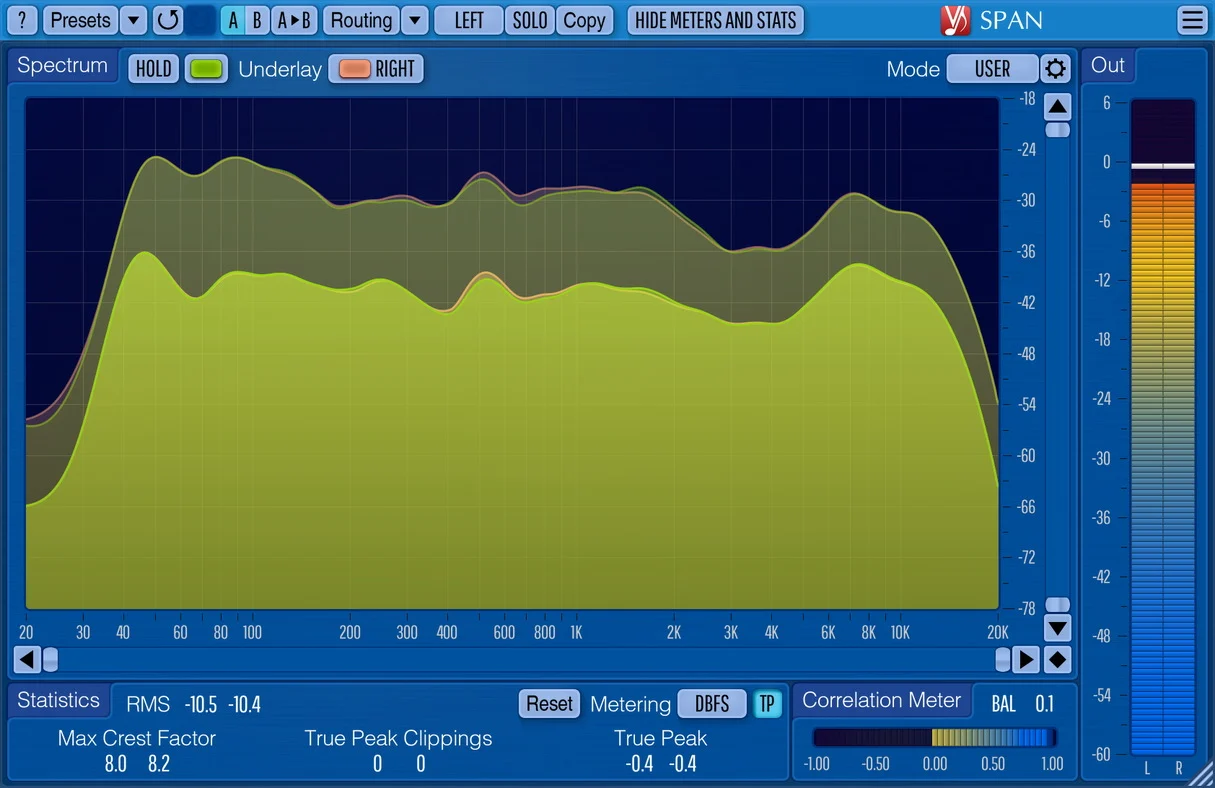
SPAN. Image: Voxengo 04SPANby Voxengo
FFT spectrum analyserBest for: Seeing the whole mix’s spectrum and levels
SPAN is the free analyser most engineers keep on the master. Its modes set the FFT size, slope and smoothing, and its metering goes beyond the spectrum: EBU R 128 and K-system scales, level statistics, crest factor, true-peak clipping and correlation. It shows what the whole mix is doing; Soap shows what one track is doing to the rest.
Why pick it
- The deepest free metering
- Every format, AAX included
Know first
- Dense settings
- Multi-track comparison needs the paid SPAN Plus
Free · SPAN Plus, paid, adds more
Voxengo's page for SPAN (opens in a new tab)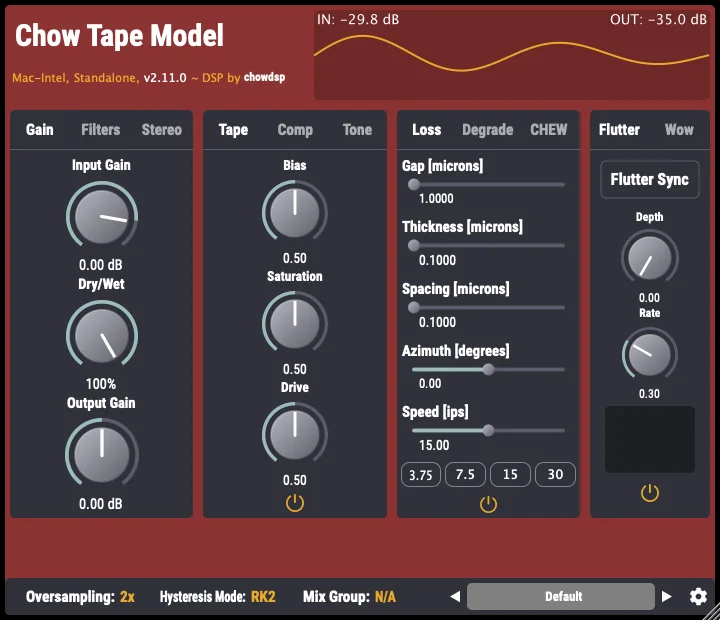
ChowTape. Image: Chowdhury DSP 05ChowTapeby Chowdhury DSP
Physically modelled tapeBest for: Tape on the buses and the master
A physical model of reel-to-reel tape, with magnetic hysteresis, wow and flutter and playback loss. On a drum bus or a mix bus it adds the soft compression and rounded top that people buy tape plugins for, and it is open source, in every format including CLAP.
Why pick it
- Real tape behaviour, free
- Open source, every format
Know first
- More to set than a one-knob saturator
- Heavier on the CPU at high drive
Free · Open source
Chowdhury DSP's page for ChowTape (opens in a new tab)
The rest of a free mixing chain
- Tokyo Dawn Labs TDR Kotelnikov: a clean, transparent compressor for the mix bus and the master, with separate release controls for peaks and for the overall level. It controls without colouring.
- Klanghelm DC1A: the opposite, a character compressor with an Input and an Output and very little else, from the makers of IVGI. The current version adds a mix control for parallel compression. Excellent on vocals and drums.
- Valhalla DSP Valhalla Supermassive: a reverb and delay built on feedback delay networks, with modes from huge and strange to subtle and realistic. The free space plugin most people install first.
- Youlean Youlean Loudness Meter 2: integrated, short-term and momentary loudness, true peak and loudness range, with a history graph, for checking a master against a streaming target.
A free chain, slot by slot
| Slot | Free pick | Where |
|---|---|---|
| Find the clash | Soap | On the tracks you suspect, with the mix on its sidechain |
| EQ | TDR Nova, or your DAW’s EQ | Every track that needs room made |
| Compression | DC1A on tracks, TDR Kotelnikov on buses | Vocals, drums, bass; the mix bus |
| Saturation | IVGI on tracks, ChowTape on buses | A little on many tracks, more on buses |
| Space | Valhalla Supermassive | On a send, never an insert, so one reverb serves many tracks |
| Metering | SPAN, Youlean, or Soap’s own meters | Last on the master |
Using them well
- Find the problem before reaching for a plugin. A muddy mix is usually two or three tracks sharing the same 200–500 Hz in the same place in the stereo image. Our muddy mix guide shows how to find them.
- Match levels when you compare. Every EQ boost, compressor and saturator changes the level, and louder always sounds better for a moment. Bypass at the same loudness, or you will keep the one with the most gain.
- Use sends for space. One reverb on a send gives the tracks a shared room and costs a fraction of the CPU of one per track.
- Check the master last. Leave a meter on the master bus while you mix, and look at it after you have listened, not instead.
For finding clashes in more depth, see frequency masking, and for analysers, the best free spectrum analysers.
Questions
Can you mix a song with only free plugins?
Yes. Your DAW's own EQ, compressor and reverb cover the basics, and free plugins such as TDR Nova, Klanghelm DC1A and IVGI, Valhalla Supermassive and SPAN are as good as many paid ones. What matters more is finding what is wrong with the mix, which is where a tool like Soap helps.
What is the best free plugin for a muddy mix?
Soap, which we make: it judges a track against the rest of the mix, shows where they clash in frequency and in the stereo image, and cuts the clash automatically or prints it to an editable EQ. A free dynamic EQ such as TDR Nova is the best tool for making those cuts by hand.
What is the best free EQ plugin?
TDR Nova for most people: four parametric bands that can each be made dynamic, filters, a wideband compressor and an external sidechain. Your DAW's own EQ is fine for simple cuts.
What is the best free reverb plugin?
Valhalla Supermassive is the one most people install first: a reverb and delay with modes from huge and experimental to subtle. Use it on a send so one instance serves many tracks.